


Table of Contents
Managed hosting costs more per month than running your own server. In exchange, it replaces your time with the provider’s time. Self-managing a server costs less in sticker price. It adds real recurring labor, and that labor has its own cost once you value your time. This article is for small business owners and solo founders deciding which route to take. In my experience, the decision comes down to one question. Do you have the hours to maintain a server, or would you rather pay someone else to do it?
What managed hosting and doing your own server admin actually mean
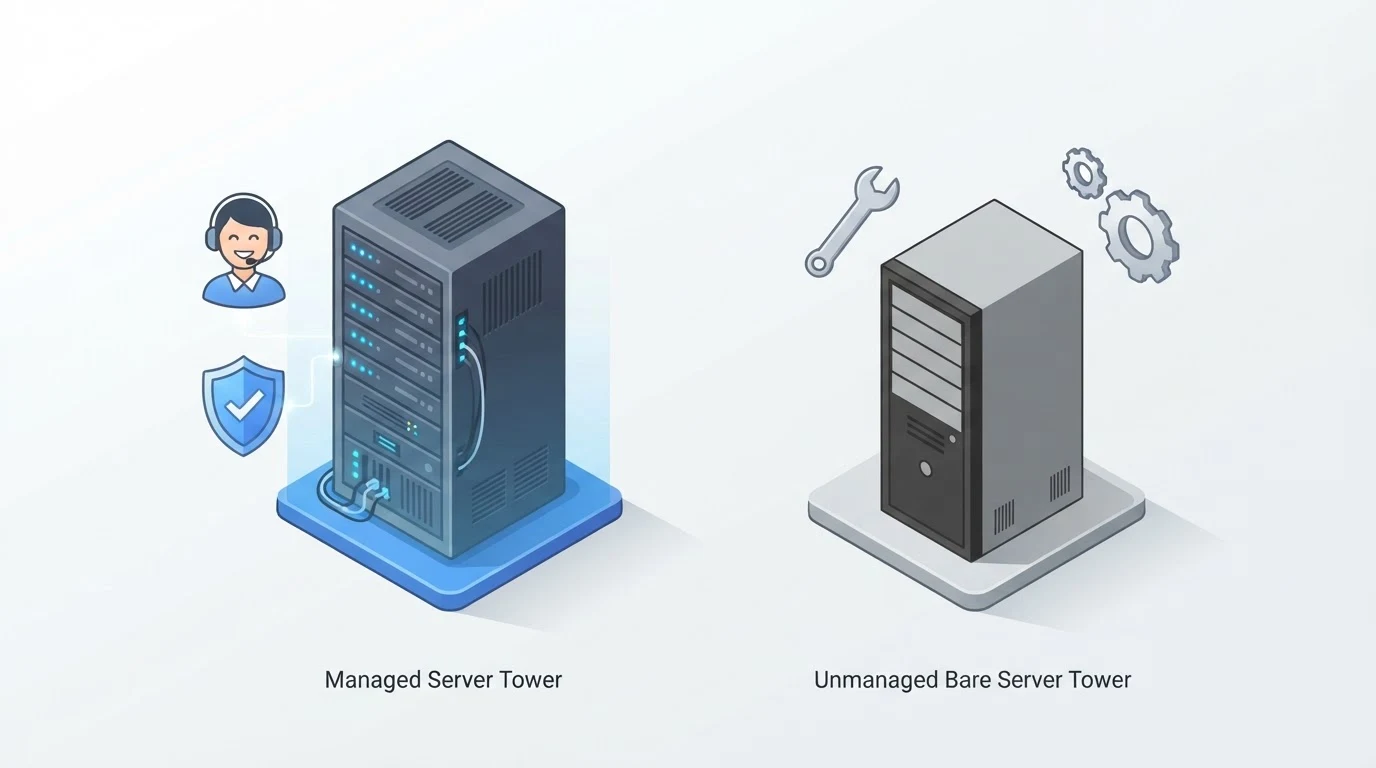
Managed hosting means you lease a server, or a slice of one, and let the provider handle maintenance, security patching, backups, monitoring, and support, so the only thing left on your plate is the application itself. You just manage your application and content. For WordPress sites, Kinsta and WP Engine take care of everything from the OS up to the WordPress core. Cloudways is a managed cloud hosting platform that handles infrastructure for you. You still manage the application layer. Infrastructure tasks are handled for you. In my experience, small business owners who choose managed hosting often never touch the command line.
Doing your own server admin means you own everything below your application. You get a bare VPS or dedicated server and handle every operational task yourself. It isn’t a set-and-forget thing. The list of recurring responsibilities is longer than most first-timers expect:
- OS and application security patching on an ongoing basis. A single missed update can lead to a compromised site or data loss.
- Backup scheduling and periodic restore testing, so you can confirm backups actually work before you need one. Many business owners assume their backups are good until a disk fails and they discover the backup was corrupted or never completed.
- SSL/TLS certificate renewal (e.g. Let’s Encrypt) plus confirming renewal succeeded. Automated tools like Certbot can handle renewal. If the automation fails, your site goes from HTTPS to a browser warning overnight.
- Ongoing uptime monitoring and having an incident-response plan for when something breaks. That means setting up alerts via email or SMS, and knowing who to call or what steps to take at 2 AM.
- Application-level troubleshooting. When your site runs slow or throws a 500 error, you need to dig into logs, check resource usage, and identify the root cause.
- Database maintenance. MySQL or MariaDB needs periodic optimization, query tuning, and crash recovery.
These tasks don’t go away after setup. They compound as you add more sites or services. Each new application doubles the surface area for patching and monitoring.
The real cost comparison
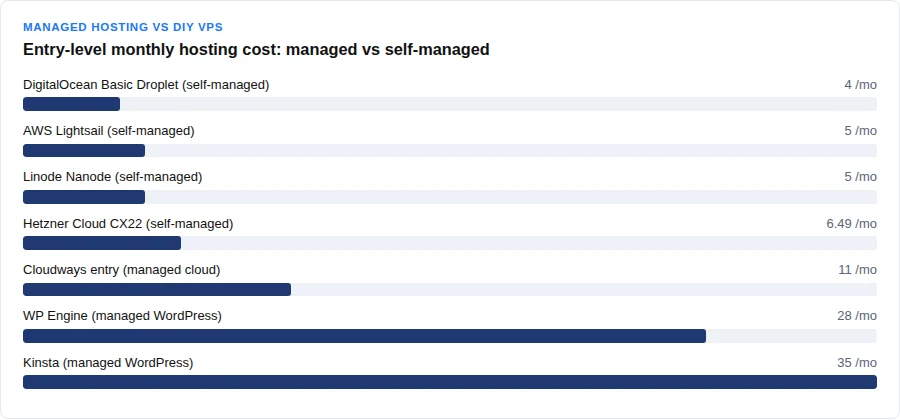
Here is a side-by-side look at what managed and self-managed options actually cost per month. Managed prices from Kinsta, WP Engine, and Cloudways. DIY prices from DigitalOcean, AWS Lightsail, Linode, and Hetzner.
| Provider | Type | Starting monthly price | Entry-level specs (RAM/CPU/storage) |
|---|---|---|---|
| Kinsta | Managed WordPress | $35 | 1 site, 10GB storage, 125GB CDN bandwidth |
| WP Engine | Managed WordPress | $28 | 1 site, 25,000 monthly visits, 10GB storage |
| Cloudways | Managed cloud (flexible) | $11 | 2GB RAM, 1 vCPU, 50GB storage, 2TB bandwidth |
| Cloudways (mid) | Managed cloud (flexible) | $88 | 8GB RAM, 4 vCPU, 160GB storage, 5TB bandwidth |
| DigitalOcean | Self-managed Basic Droplet | $4 | 512MB RAM, 1 vCPU, 10GB SSD |
| AWS Lightsail | Self-managed VPS | $5 | 1GB RAM, 2 vCPU, 40GB SSD |
| Linode (Akamai) | Self-managed Nanode | $5 | 1GB RAM, 1 CPU, 25GB storage |
| Hetzner Cloud | Self-managed VPS (CX22) | $6.49 | Price only, per Hetzner’s 2026-06-15 adjustment |
| DigitalOcean (mid) | Self-managed Droplet | $24 | 4GB RAM, 2 vCPU, 80GB SSD |
| AWS Lightsail (mid) | Self-managed VPS | $24 | 4GB RAM, 2 vCPU, 80GB SSD |
| Linode (mid) | Self-managed Linode 4GB | $24 | 4GB RAM, 2 CPU, 80GB storage |
| Hetzner (mid) | Self-managed VPS (CX43) | $18.49 | 4 vCPU, 8GB RAM, 80GB SSD |
The DIY sticker price looks dirt cheap. A $4 DigitalOcean Droplet seems like a steal. That number ignores the labor you’ll put into keeping it alive. A $5 Linode Nanode is similarly tempting until you factor in the time spent on routine maintenance.
Freelance systems administrators charge roughly $44 to $68 per hour, according to a small-sample Glassdoor figure. A broader general-market survey from Clockify pegs administrator hourly rates at about $28.36. Let’s use the combined range: $28 to $68 an hour. Say a server needs a few hours of attention some months. Fixing a security update that broke your site, diagnosing a MySQL crash, verifying backups after a disk failure. The average of the Glassdoor range works out to $55 an hour. A 3-hour incident at that rate costs $165. Suddenly your $5 VPS cost you $170 that month. That’s the real price.
No reliable data pins down a specific hours-per-month figure — every admin’s workload differs. The principle still holds. The cheaper your server bill, the more you pay in time. A managed hosting plan at $35 per month may seem expensive next to a $5 VPS. That price includes all the labor. If you value your own time at $30 per hour, a managed plan pays for itself after just one hour of avoided work per month.
Uptime and what downtime actually costs you
Uptime guarantees look good on paper. Kinsta offers a 99.9% uptime SLA by default, which allows about 43.8 minutes of downtime per month. AWS EC2 commits to 99.99% uptime monthly for instances spread across two or more Availability Zones. A single non-redundant instance falls under AWS’s lower 99.5% instance-level SLA, which permits roughly 3.6 hours of downtime per month (calculated from a full month). DigitalOcean promises 99.99% uptime per individual Droplet. That covers infrastructure only. OS or application failures remain the customer’s job on an unmanaged Droplet.
> Managed hosting trades money for time. Self-admin trades time for money. The tradeoff is only worth it if you actually have the time to spend.
Under AWS’s shared-responsibility model (now standard across the industry), the customer is responsible for patching and updating the guest OS and application software. That means all the labor I just described is yours. A managed provider absorbs that work into your monthly bill. When your site goes down because you forgot to apply a security patch, the managed host’s support team handles the fix. On a self-managed VPS, you’re on your own.
Who should choose managed hosting
Use this checklist. If you answer yes to most, pay for managed hosting.
- You’re non-technical. You don’t know SSH from SSL. You don’t want to learn.
- You don’t have time for ongoing operations. Running the business already fills your workday.
- You want a support line to call. When your site is down, you want someone else responsible for getting it back up, not a forum post.
- Your business depends on uptime. Every minute of downtime costs you real revenue or reputation. The SLA matters more than the monthly fee.
- You don’t want to be on call 24/7. Some managed hosts offer 24/7 support to handle incidents. With self-admin, you’re the incident response team.
Who should do server admin themselves
Use this checklist. If most apply, DIY might fit.
- You have a technical background or are willing to learn. Maybe you’re already a developer or sysadmin by hobby or trade.
- You want full root control. You need to install custom software, configure the kernel, control panels like cPanel, or optimize every setting.
- You’re cost-sensitive and have the time budget. The $4 VPS is attractive if you have the hours to set it up and manage it.
- You have a real time budget for ops. Block out actual hours every month for maintenance and emergency response, not a vague plan to “figure it out later.”
- You have a backup plan for when you’re unavailable. If you go on vacation or get sick, who handles a server outage? You need a fallback or a trusted colleague.
- You’re comfortable with the Linux command line and troubleshooting. SSH, grep, systemctl, and reading logs should be second nature. If the thought of configuring a firewall makes you nervous, self-hosting isn’t a good fit without a lot of upfront learning.
When you outgrow a managed plan
Managed plans cap your traffic. Kinsta’s Starter plan includes 35,000 monthly visits and you pay $0.50 per 1,000 visits over that cap. They also charge overage for disk ($2 per GB), CDN ($0.05 per GB), and server bandwidth ($0.50 per GB). If your overage costs reach or exceed your plan cost (or $500, whichever is less), they call it “extreme overage” and may force immediate payment, an upgrade, or temporary access limiting. The escalation isn’t subtle. You get a bill, then a notice, then your site could be restricted until you move to a higher tier. WP Engine’s plans also cap monthly visitors. When you go over, they bill $2 per 1,000 extra visitors on your next invoice. They don’t throttle or suspend your site for it. That’s gentler. The cost still adds up if you exceed the cap every month.
If you hit overage every month, it’s time to move up a tier or consider a different approach. Managed hosting scales to a point, then the pricing steps become steep. Some businesses switch to a self-managed VPS at that stage, especially if they have technical resources to handle the load. The labor cost transfers back to you too. A mid-tier self-managed VPS at $24 per month may look cheap. You’ll still spend time managing it. The tradeoff is predictable at low traffic. At high traffic, the labor cost can spike as you tune performance and handle incidents.
Conclusion / the bottom line
For most small business owners and solo founders who aren’t technically inclined, managed hosting is the better value. The higher monthly fee buys you sleep. You pay a premium to offload labor that would otherwise consume your evenings and weekends. You also get predictable uptime and support that you can call when something breaks.
If you already have the skills and a realistic time budget, self-admin can save you money on sticker price per month, especially at low traffic. But the labor cost accumulates over time: don’t fool yourself into thinking a $5 VPS is a permanent $5 expense. It’s a $5 expense plus however many hours you invest, and those hours can erase the sticker-price savings the longer you run it yourself. You must still accept the hidden cost of your own time and the risk of longer downtime during incidents. Many businesses start with managed hosting and move to self-managed later, once they outgrow the caps or need full control. The right answer depends on your tolerance for labor and downtime.
FAQ
Is managed hosting worth the extra cost?
It depends on your time and technical comfort. If you value your free time at anything above $30 an hour and you aren’t already a sysadmin, managed hosting usually pays for itself in labor savings alone. You also get a support team to handle issues you can’t solve yourself.
Can I switch from managed to self-managed hosting later?
Yes. You can migrate a site from a managed host to a self-managed VPS at any time. Just export your files and database, import them on the new server, and update your DNS. The migration itself is a technical task, so factor in that labor or hire someone to do it.
How much technical skill do I need to self-host a server?
You need to be comfortable with the Linux command line, basic networking, SSH, and troubleshooting application errors. You also need to understand security patching and backup verification. None of that is exotic knowledge. It takes real hours to learn if you’re starting from zero, so budget for a learning curve before you point a live business site at a bare VPS.
What happens if I exceed my managed hosting plan’s visitor limit?
Kinsta charges fifty cents per 1,000 extra visits and may force an upgrade if overage costs become extreme. WP Engine bills $2 per 1,000 extra visitors on your next invoice. Both providers let you upgrade to a higher plan to reset your cap. Check your plan’s terms before you run over.
Is a VPS the same thing as managed hosting?
No. A VPS is just raw virtual server space. Managed hosting includes administration services on top of that server. Cloudways is a managed cloud hosting platform. Kinsta and WP Engine are fully managed WordPress hosts. When you buy a bare VPS from DigitalOcean or Linode, you are responsible for OS and application administration.
Do I need a dedicated server or is a VPS enough for a small business?
For most small businesses, a VPS is plenty. Dedicated servers cost much more and are only necessary for heavy traffic, strict compliance requirements, or custom hardware needs. Start with a mid-tier VPS and migrate up only if you consistently max out your resources.
Can I run WordPress on a self-managed VPS?
Yes. You’ll need to install and maintain the web server, PHP, MySQL, and WordPress itself. You’re responsible for updates, backups, and security. Managed WordPress hosts like Kinsta and WP Engine handle all of that for you. If you’re comfortable with the command line, self-managed WordPress is doable. If not, stick with managed hosting.
Thank you for reading!